suspension TESLA MODEL X 2016 Owner's Manual
[x] Cancel search | Manufacturer: TESLA, Model Year: 2016, Model line: MODEL X, Model: TESLA MODEL X 2016Pages: 179, PDF Size: 4.3 MB
Page 44 of 179
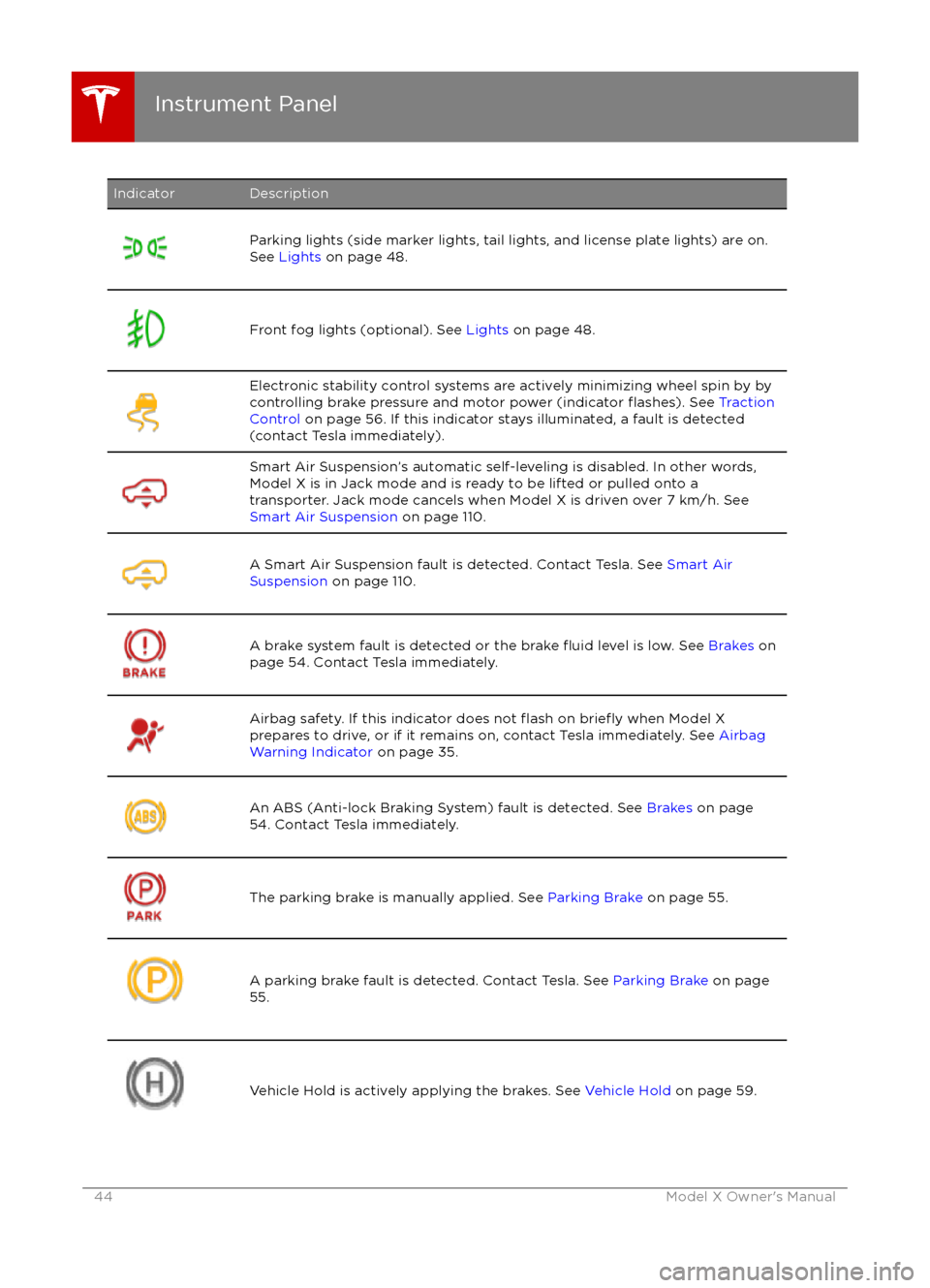
IndicatorDescriptionParking lights (side marker lights, tail lights, and license plate lights) are on.
See Lights on page 48.Front fog lights (optional). See Lights on page 48.
Electronic stability control systems are actively minimizing wheel spin by by
controlling brake pressure and motor power (indicator flashes). See Traction
Control on page 56. If this indicator stays illuminated, a fault is detected
(contact Tesla immediately).Smart Air Suspension
Page 69 of 179

touchscreen (Controls > Driving > E-Brake &
Power Off > Parking Brake).Warning: Do not rely on Model X to
detect the trailer and automatically
engage Trailer Mode. Always check that
Trailer Mode is engaged before towing a trailer.Warning: Under no circumstances shouldyou exit Trailer Mode when towing a
trailer. Doing so can cause serious injury
and/or death.Warning: Do not use the air suspension setting to appropriately match the height
of the hitch with the height of the trailer.
You must choose a trailer hitch and trailer
that have the appropriate height for suitable axle loading and trailer balance.Warning: Do not use Trailer Mode when
attaching a bicycle carrier to the trailer
hitch (see Using a Bicycle Carrier on page
71).
While Towing a Trailer
Model X is designed primarily as a passenger- carrying vehicle. Towing a trailer putsadditional load on the motor, drive train,brakes, tires and suspension and
significantlydecreases range. If you decide to tow a trailer,
proceed with caution and follow these general
guidelines:
Page 98 of 179
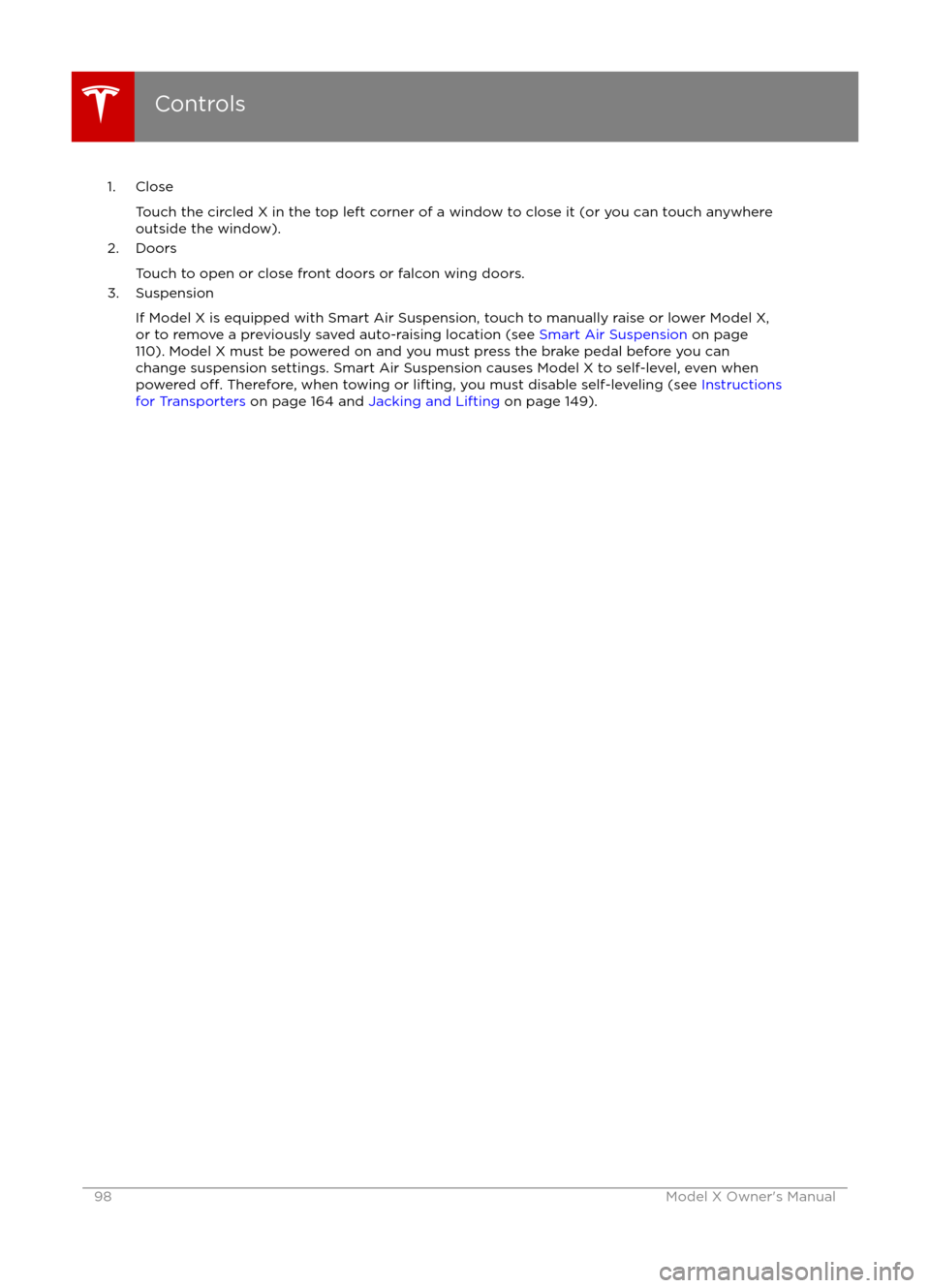
1. CloseTouch the circled X in the top left corner of a window to close it (or you can touch anywhere
outside the window).
2. Doors
Touch to open or close front doors or falcon wing doors.
3. Suspension
If Model X is equipped with Smart Air Suspension, touch to manually raise or lower Model X,or to remove a previously saved auto-raising location (see Smart Air Suspension on page
110). Model X must be powered on and you must press the brake pedal before you can
change suspension settings. Smart Air Suspension causes Model X to self-level, even when powered
off. Therefore, when towing or lifting, you must disable self-leveling (see Instructions
for Transporters on page 164 and Jacking and Lifting on page 149).
Controls
98Model X Owner
Page 110 of 179

Note: If Model X is equipped with Smart AirSuspension, you may hear the sound of the
compressor when Model X starts, as the system
Page 111 of 179

Note: Manually lowering the suspension toStandard or Low while at a saved location alsoremoves the auto-raising location.
Automatic Lowering
When Model X is moving above typical
driveway or parking lot speeds, Smart Air
Suspension automatically lowers ride height to improve aerodynamics and handling. For most
average speed driving, the suspension is
automatically set to Standard. As described
above, when you make manual height adjustments, the suspension automatically
lowers at increased driving speeds.
When carrying loads, Smart Air Suspension
also maintains a level height between the front
and rear.
You can adjust the speed at which the Air
Suspension automatically transitions to the LOW ride height by touching Controls >Suspension > Automatic Lowering on the
touchscreen. This setting is saved to your
Driver
Profile.
Note: You can temporarily override the ride
height by pressing the brake pedal, touching
an air suspension control in Controls >
Suspension, and then manually choosing a
ride height. Your suspension
Page 149 of 179

Jacking Procedure
Follow the steps below to lift Model X. Ensure
that any non-Tesla repair facility is aware of
these lifting points.
1. Position Model X centrally between the lift posts.
2. If your Model X is equipped with Smart Air Suspension, it automatically self-levels,
even when power is
off. Use the
touchscreen to set the suspension as
follows:
Page 158 of 179

Brakes
Type
4-wheel anti-lock braking system (ABS)
with Electronic Brake Force Distribution,
Integrated Advanced Stability Control and
Electronic Accelerator pedal actuated
regenerative braking systemCalipersFour piston fixedRotor Diameters (ventilated)Front: 13.98”/355 mm
Rear: 14.37”/365 mmFront Rotor thicknessNew: 1.26”/32 mm
Service limit: 1.18”/30 mmRear Rotor thicknessNew: 1.10”/28 mm
Service limit: 1.02”/26 mmFront Brake Pad Thickness (excluding back plate)New: 0.354”/9.0 mm
Service limit: 0.078”/2 mmRear Brake Pad Thickness (excluding back plate)New: 0.315”/8.0 mm
Service limit: 0.078”/2 mmElectronic Parking Brake (EPB) Pad Thickness
(excluding back plate). Electronic calipers self-
adjust for pad wear.New: 0.216”/5.5 mm
Service limit: 0.039”/1 mmParking brakeElectrically actuated parking brake
calipers
Suspension
FrontIndependent, double wishbone, air spring,
sway barRearIndependent, multi-link, air spring, sway
bar
Battery - 12V
Rating33 amp-hr or higherVoltage and Polarity12V negative (-) ground
Subsystems
158Model X Owner
Page 164 of 179

Use a Flatbed OnlyUse a
flatbed trailer only, unless otherwisespecified by Tesla. Do not transport Model X
with the tires directly on the ground.
Caution: Damage caused by transporting is not covered by the warranty.Caution: To transport Model X, follow the
instructions exactly as described next.
Disable Self-Leveling (air
suspension vehicles only)
If Model X is equipped with Smart Air
Suspension, it automatically self-levels, even
when power is
off. To prevent damage, you
must activate Jack mode to disable self-
leveling:
1. Touch Controls > Suspension on the touchscreen.
2. Press the brake pedal, then touch Very High to maximize height.
3. Touch Jack.
When Jack mode is active,
Model X displays this indicator
light on the instrument panel,
along with a message telling you
that active suspension is
disabled.
Note: Jack mode cancels when Model X is
driven over 7 km/h.
Warning: Failure to activate Jack mode on
a Model X equipped with Smart Air
Suspension can result in the vehicle
becoming loose during transport, which
may cause
significant damage.
Activate Tow Mode
Model X may automatically shift into Park
when it detects the driver leaving the vehicle,
even if it has previously been shifted into Neutral. To keep Model X in Neutral (which
disengages the parking brake), you must use
the touchscreen to activate Tow mode:
1. Shift into Park.
2. Press the brake pedal, then on the touchscreen, touch Controls > Settings >
Service & Reset > Tow Mode.When Tow mode is active, Model X
displays this indicator light on the
instrument panel, along with a
message telling you that Model X is
free-rolling.
Note: Tow mode cancels when Model X is
shifted into Park.
Caution: If the electrical system is not
working, and you therefore cannot release
the electric parking brake, attempt to
quick start the 12V battery. For
instructions, call Tesla. If a situation
occurs where you cannot disengage the
parking brake, use tire skids or transport Model X for the shortest possible distance
using wheeled dollies. Before doing so,
always check the dolly manufacturer
Page 175 of 179
AABS (Anti-lock Braking System) 54
Acceleration (dual motor) 97
access panel, removing 146accessoriesinstalling 150
plugging into power socket 114
active hood 61
adaptive headlights 51
air circulation 106
air conditioning 105
air distribution 106
air
filter 109
air suspension 111
air vents 109
airbag, front passenger, disabling 34
airbags 32
alarm 121
all-season tires 135
always connected, setting 63
antennas 9
anti-lock braking (ABS) 54
audioplaying files 112
steering wheel buttons 37
volume control 112
Auto High Beam 51
Auto Lane Change 82
auto-raising suspension 110
Autopark 84
Autopilot 72
Autosteer 80
B
backup camera 65
battery (12V)complete discharge 127specifications 158Battery (high voltage)care of 127
coolant 146
specifications 159
temperature limits 127
battery (key), replacing 5
blind spot warning 86
Bluetoothdevices, playing audio files from 113
general information 115
phone, pairing and using 115
body repairs 150
body touch up 144
brake
fluid replacement 132
brakesautomatic in emergencies 88fluid level 147
overview of 54brakes (continued)specifications 158
brightness of displays 101
C cabin temperature control 105
calendar 119
camera (rear view) 65
car cover 144
car washes 142
Cargo Mode 20
cargo space, maximizing 20
carpets, cleaning 143
CE
certifications 173
CHAdeMO 126
chains 136
change of ownership 104
charge port 128
charge port light 129
chargingcharge settings 130
components and equipment 125
instructions 128
public charging stations 126
scheduling 130
status of 131child protectiondisabling liftgate and rear door handles 9
disabling rear window switches 11child seatscleaning 143
disabling front passenger airbag 34
installing and using 24
cleaning 142
climate controls 105
climate ionizer 101
clock 37
Cold Weather controls 97
collision avoidance assist 88
console12V power socket 114
cup holders 17
USB ports 114contact informationroadside assistance 163coolantBattery, checking level of 146
Battery, replacement interval 132
copyrights 166, 167
Creep 97
cruise control 75
cup holders 17
customizing 101
Index
Index175
Page 176 of 179
D
dashboard overview 2
data recording 168
day mode 101
declarations of conformity 173
delivery mileage 168devicesBluetooth, playing audio files 113
connecting 114
playing audio
files from 113
dimensions 155
display brightness 101
dome (map) lights 48
door labels 152
Door Unlock Mode 4
doors 4
doors, opening 4
Drive gear 42
drive-away locking 9
driverprofiles 36
seat adjustment 18driver assistanceAuto Lane Change 82
Autopark 84
Autosteer 80
blind spot warning 86
collision avoidance assist 88
forward collision warning 88
overtake acceleration 75
overview 72
settings for 101
side collision avoidance 86
side collision warning 86
staying inside lane markings 86
Traffic-Aware Cruise Control 75
drivingseating position 18
starting 41
tips to maximize range 63
E
electric parking brake 55
emergency
flashers 52
energygained from regenerative braking 55
range information 43, 46
tips to minimize usage of 63
energy & charging setting 101
energy app 63
energy saving mode 63
Erase & Reset 104
event data recording 168
exteriorcar cover 144
cleaning 142exterior (continued)dimensions 155
lights 48
overview 3
polishing, touch up, & repair 144
F
factory defaults, restoring 104
factory reset 104
fan speed, interior 106
favorites, adding and removing 113
FCC
certifications 173
features, downloading new 123
firmware (software) updates 123flash drives, playing audio files from 113flashers, warning 52flat tire repair 138floor mats 144
fluidsreplacement intervals 132
reservoirs, checking 146
fog lights 48
forward collision warning 88
front passenger detection 34
front trunk 14
fusesremoving access panel 146
G
GAWR 153
gears 42
glove box 16
Gross Axle Weight Rating 153
Gross Vehicle Weight Rating 153
ground clearance 155, 156
GVWR 153
H hazard warning
flashers 52
head restraints 20
headlightsadaptive 51
after exit 51
high beams 51
heated wipers 53
heating 105
height adjustments (suspension)auto-raising 110
automatic and manual settings 111
disabling (Jack mode) 111
high beam headlights 51
high voltageBattery specifications 159
Index
176Model X Owner